luis171 (Customer) asked a question.
P1AM-100 "USB Device Not Recognized" error in Arduino 2.3.6
Initially I installed the Arduino IDE 2.3.6 under Windows 10 64 bits, successfully installed the P1AM-100 USB driver and the boards installer. Initially when I connected for the very first time the P1AM-100 Windows recognized correctly right away. However I downloaded one digital reading example to the CPU then the IDE was not able to upload the program giving a message "USB Device Not Recognized". I tried double clicking on the reset button and the PLC goes to the bootloader mode but when try to download the application again the system first load the bootloader and then when reset the CPU the problem appeared again with the same message. Please let me know if someone has seen this problem and solved.
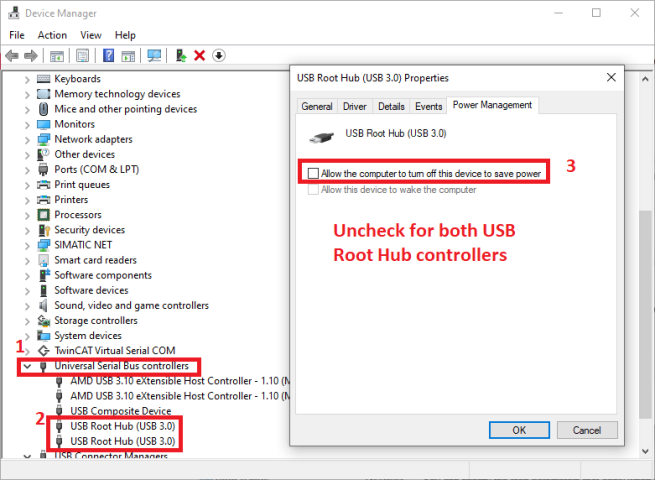
Finally, after some testing, I ruled out the possibility that the cable was malfunctioning or lacking data capacity, as I purchased a programmer's cable that had the same behavior. In my case, the solution was to disable the power-saving feature in the root USB hub driver in Device Manager. I use a laptop, so it stands to reason that the voltage on the USB ports can be reduced to save power. Troubleshooting steps are attached.