wyoSparky (Customer) asked a question.
Productivity 1000 Implicit messaging
Good evening, I'm working on a project in which i'm using a productivity 1000 cpu to gather and store data from (2) SMC-Flex soft starts. I have found the video on the website but i still need guidance.
In the video, there are parameters that i can't change and they don't align with anything i've seen in the SMC-Flex.
Because i've not been able to get implicit messages set up, i've started using explicit ones instead. Do i need to put a timer/counter so the messages "take turns" like i would if it were modbus? or is it ok that they're all operating at once?
1.) Have you tried importing the .eds file for the SMC Flex start to see if you can get I/O messaging working?
2.) Which video are you referencing?
3.) Can you provide screen shots of your setup?
4.) Are you wanting to do connected or unconnected Explicit messaging?
5.) Can you provide a link to the user manual explaining addressing for the parameters you want to access or control?
Thanks for the response!
1) i have not tried that, i'm very new to this stuff, especially the communication side of things, and i don't know how to do that.
2) The video is on the automation direct website, Productivity series "How to set up an ethernet/ip I/O adapter" and the screen i referenced is the "ethernet/IP adapter" setup screen. On the right side of it, there are boxes with connection point, class, instance, and attribute populated and unavailable to change.
3) I'll attach pics of that window, let me know if there's something else you'd like to see.
4) I'd rather do connected messaging for the data i'm reading constantly. the only reason i started using unconnected is because i couldn't get the other to work for me.
5) https://literature.rockwellautomation.com/idc/groups/literature/documents/rn/20come-rn002_-en-e.pdf
that's on the AB website, hopefully you're able to open it.
Can you provide the part number for your soft starter?
It appears that your soft starter is going to be your EtherNet/IP adapter, thus your P1000 CPU will be the scanner. Below is a video showing how to do this setup but with a PowerFlex drive:
https://www.automationdirect.com/videos/video?videoToPlay=FXDNHxY4W9o&cat1=1&cat2=7&q=ethernet%2Fip
The video was done on a old version of the software so several improvements have been added including import of an .EDS file. You can go to vendor's site and find the EDS file needed to import into the software to make your setup easier.
I'll give that a try. Thank you! How were you able to deduce that the SMC Flex will be the adapter, rather than the scanner?
Part number is 150-F251NBDB Series B and we're utilizing a 20-COMM-E Ethernet/IP module on each soft start
It states that the 20-COMM-E is an EtherNet/IP adapter communications module:
https://literature.rockwellautomation.com/idc/groups/literature/documents/um/20comm-um010_-en-p.pdf
😕 I saw that too, i just didn't think of it as an ethernet adapter in the adapter/scanner relationship, though it literally says it... lol. K i pretty well have that situation sorted out, thanks for that. I'll need help eventually with sending explicit messages, but for now i have another question;
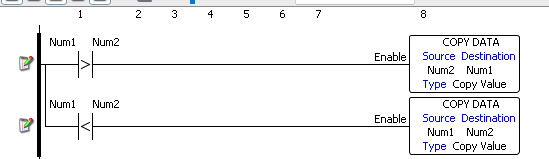
where is the move instruction in the productivity suite software? i just want to compare two values and if one is smaller than the other, move the smaller one into that register...
Use CMP and CPD.