cwizard55 (Customer) asked a question.

Troubleshooting Wiring a Prosense Pressure Sensor 4-20ma to Click Plus

I am having issues getting getting signals from a Prosense Pressure Sensor into my ClickPlus Analog Module.


I have a C0-01AC Power Supply, C2-01CPU, C2-08DR-6C Analog Module, and a Prosense SPT25-20-0060A.


When I use an amp meter I get a 4-20mA signal that changes with pressure applied to the pressure sensor. Atomspheric gets 4mA and when pressure is applied the mA rises. So the sensor seems to be working fine.


I want to know if I am wiring this into the C2-08DR-6C correctly. The Prosense Sensor Red wire is going to the C0-01AC power supply 24+. The Prosense Sensor Black is going to AD1I on the C2-08DR-6C Analog Module. I have wiring connecting the C2-08DR-6C Analog Module ACOM port next to the AD1I port back to the power Supply 0V(not ground).


When Config the board choosing DF1 as the AD1I register and checking the Click software system monitor I get 0.0mA despite an Amp meter hooked in serial showing 4mA. Using the same wiring config I have tried moving to AD2I, AD3I, AD4I, but get the same result.


What am I doing wrong?


  • cwizard55 (Customer)

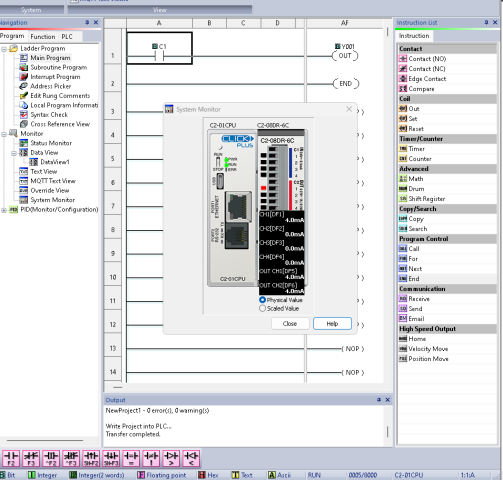
    It worked, Thanks for the help. I guess it needs to have a running Program. Now I need to learn Ladder logic. Screenshot 2024-02-28 204654
    Selected as Best
  • OkiePC (Customer)

    Your wiring sounds right. Are you sure you have transferred the latest configuration changes to the PLC and that it is in RUN mode?

    • Durallymax (Customer)

      +1 wiring is correct, meter verifying signal rules out sensor. PLC does need to be in RUN for analog signal to appear on DF1. If in run, verify the card is at least partially working by toggling some of the relays.

      • Durallymax (Customer)

        Correction, PLC does not need to be in run for Analog scaling to work, at least on a traditional Click analog series.

      • cwizard55 (Customer)

        Setting the Click to run changed nothing. When I uploaded a valid program it worked immediately. Maybe the Click plus is different?

    • cwizard55 (Customer)

      I haven't specifically kept it in run, but I feel like I tried that at one point and it didn't work either. Do I need to have a ladder program on the PLC to do the monitoring?

      • Durallymax (Customer)

        No program is needed. Although IIRC it may yell at you if you try to transfer and have no program so just stick an NO contact with C1 on rung one and Y001 as an OUT coil. Then transfer to PLC.


        Do you have screenshots or a copy of your config?

      • cwizard55 (Customer)

        It worked, Thanks for the help. I guess it needs to have a running Program. Now I need to learn Ladder logic. Screenshot 2024-02-28 204654

        Selected as Best
  • cwizard55 (Customer)

    On the module, are the little squares next to the screw terminal indicator lights?

    • Durallymax (Customer)

      Yes, but they are blank for analogs. You should be able to toggle the outputs on and off from the program though and see the lights change state.