Techknowman (Customer) asked a question.
Array Tags on C-More
I'm looking for an easy way to display tags From Arrays on a C-More.
For example
I have a UDS In the PLC that has the following
DATA.Modbus40002(Index#)
DATA.Modbus40003(Index#)
The "DATA.Modbus(#)" is 10 Deep
# is the station number
"DATA.Modbus40002(1) thru "DATA.Modbus40002(10)" are the Tag Names
On the C-More I want to have a single Numeric Display where the Data Display Tag can be
DATA.MODBUS40002(STATION#)
I want "STATION#" be a variable that can be entered on the OIT so only the selected data
is displayed in the Numeric Display.
I hope this all makes sense?
Create an additional instance of the UDS in the PLC as a buffer for use in HMI.
Create C-More objects using this additional HMI instance.
Copy the UDS at selected index in PLC into the HMI buffer instance.
This is exactly how I do it.
That's a great Idea. The PLC has far more horsepower to handle that sort of thing
What I'm trying to figure out is the best way to set up the array(s)
Using the Modbus MRX and WRX I want to read 18 Modbus addresses in a row 40002 to 40020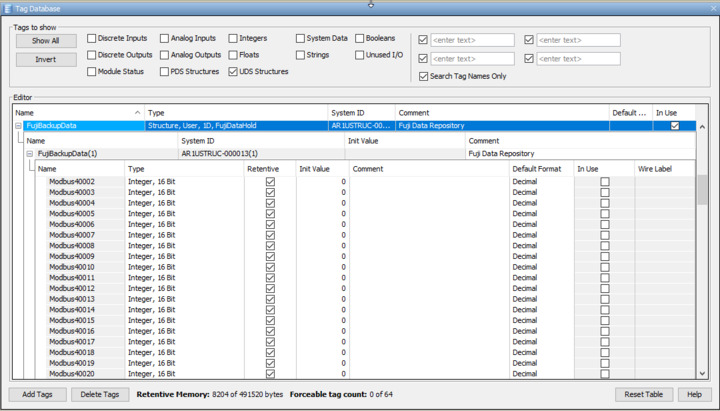
 The issue is in the ARRAY FIELD of the MRX only lets me select FujiDataBackup.Modbus40002
I want to store all the Modbus register data in a single array like the variable I created FujiDataBackup(1) being all of station 1, etc.
I have 6 stations and want to be able to read all 6 stations, store them and then later be able to write the selected address to a replacement unit. Like take station 6 and copy to station 10 which is the replacment unit. then all I have to do is change #10 to #6
To answer your first question, I believe once you pick your first address of the array, in the "End Index" box you'd put the number, 19.
Can you nest it one more level? FujiBackupData(1).Modbus4(x)