Linuxdept (Customer) asked a question.
Encoder Rollback
in the Click is there a way to eliminate Rollback in a encoder and eliminate the Rollback values and add or subtract the values
Linuxdept (Customer) asked a question.
in the Click is there a way to eliminate Rollback in a encoder and eliminate the Rollback values and add or subtract the values
Hi @Linuxdept (Customer)
In the high-speed counter mode, select the quadrature input (A and B).
https://accautomation.ca/click-plc-high-speed-counting-part-1/
Garry
https://accautomation.ca/series/click-plc/
Can you clarify what you mean be "eliminate the rollback". If an encoder turns backwards from its normal direction there are two basic reactions by a counter input. If only one lead is used the counts in the reverse direction are indistinguishable from those in the forward direction and the accumulated counts continue to rise. If the quadrature mode is used the accumulated count begins to decrease.
By "eliminate the rollback" do you mean completely ignoring the extra counts? If so hook up in the quadrature mode, as Garry shows, then in your program copy the current count to another location on each scan ONLY IF the new count is larger than the previously copied value. This would eliminate using counts during the "rollback" and during the advance to the position before "rollback" began.
We Basically have a Plastic Wheel now installed with Holes cut in them we are going to have to offset another LED Emitter and receiver, as an offset second input to give us both X001 and X002 input, i have my Click Plus PLC set as below. "image" so i don't want to see rollback on the Encoder. what would the PLC ladder logic look like, > ?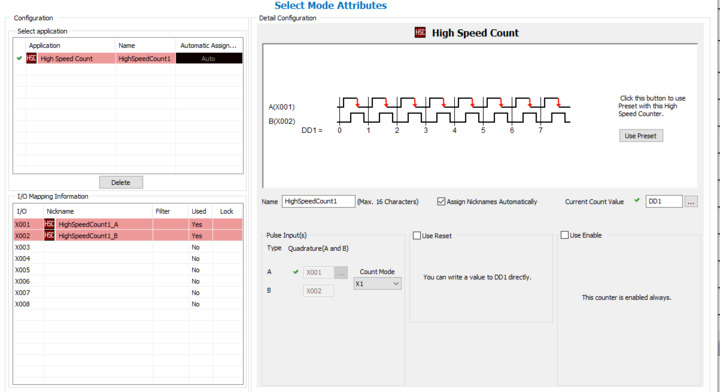
Is "rollback" caused when the plastic wheel turns backwards? For example the counts increase to 10 then move backwards to let's say 7. When the plastic wheel starts turning forward again the counts increase passing through 10 and on up. So the normal sequence provided by the quadrature setup looks like:
1, 2, 3, 4, 5, 6, 7, 8, 9, 10, 9, 8, 7, 8, 9, 10, 11, 12, 13 etc
Do either of the following match your concept of 'not seeing' the rollback?
1, 2, 3, 4, 5, 6, 7, 8, 9, 10, 10, 10, 10, 11, 12, 13, 14, 15, 16 etc (This doesn't decrease but starts counting again as soon as forward rotation begins.
1, 2, 3, 4, 5, 6, 7, 8, 9, 10, 10,10, 10, 10, 10, 10, 11, 12, 13 etc (This doesn't decrease and waits until the measured count catches up before increasing.)
Or is my interpretation of "rollback" wrong?
So we have 1 Photo-eye and the Plastic wheel with holes of Course, so when the Line stops the chain drifts back causing a count if the chain drifts back far enough then we may get 5 or 10 counts these inputs are going Directly into a Schneider OTB so we get pulses in both Directions. as Counts
so i was going to put another photo-eye in the Setup offset from the first and go into a Click PLC "XOO1 & X002" to get the "rollback" Monitored and fixed. i wish they would just put a quadrature Encoder in future Installations.
can someone Help me with the Ladder Portion,
Did you try my code in my second post Nov 1, 2021?