Linuxdept (Customer) asked a question.
i have a Click PLC Program i have written that uses the Pack and Unpack Instructions "Diagram"
how can i accomplish this same thing with the Productivity 2000 , thanks everyone
how can i accomplish this same thing with the Productivity 2000 , thanks everyone
Hi @Linuxdept (Customer),
The CPD (Copy Data) instruction will work. You will see how you can copy the value or copy the binary. Binary would mean bit for bit.
The Unpack Bits (UPKB) instruction will then take a register and set the bits.
Regards,
Garry
https://accautomation.ca/series/productivity-1000-plc/
we are basically Communicating to the ClickPlus with a Modbus address that we send an Integer to the DS300 from a single copy to DH20 then we use DH20 in the unpack right to the outputs, can you provide a small example in Productivity 2000 that does the same thing
Can you try Bit of Word in a CopyData instruction. Where a.b.c is your Group.Base.Slot
My ladder Looks like the Following but the RELAY1 is not showing up be used in the unpack command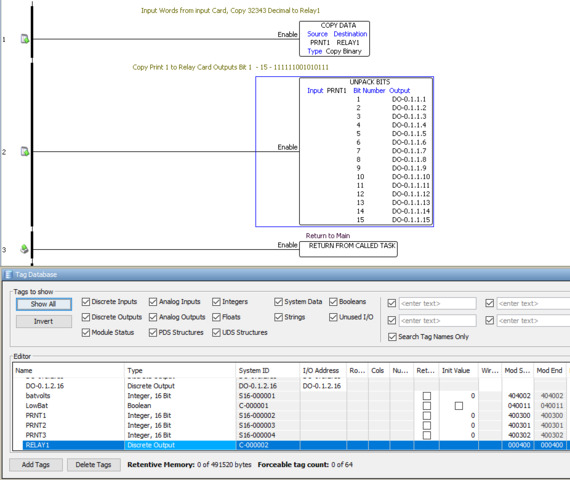
Im a bit confused by your logic there. The first instruction shows you copying an integer of supposedly "32343" to a control bit? That doesnt really work.
Hi @Linuxdept (Customer),
In your example, you would use one or the other methods. Not both like you would in the Click PLC.
PRNT1:1 to PRNT1:16 would represent all of the bits in PRNT1
I hope this helps you out.
Regards,
Garry
so if i use the UPKB (unpack bits) as Shown below and i put a INT of 32768 in PRNT1 this would Covert it to Binary we would have 1000000000000000 i hope this is correct that would be so easy
You are correct. If PRNT1 (Unsigned 16 Bit) contains the value of 32768 then this would be 1000 0000 0000 0000.
Regards,
Garry
It Worked, Hurray.!!!
Glad you got it going.
Thanks for the update.