
MacroPc (Customer) asked a question.
So I'm at the point in my learning and my little project that I'm ready to start manipulating my servo. We use Motion Control V4, TRIO (currently P6 Nano), Proface HMI (with GP PRO EX), and a Kollmorgen AKM52L Servo with a Kollmorgen AKD controller..
The Nano is connected to the AKD controller via ethernet cord and the AKD to the servo using their big cord of wires.
All I'm currently trying to do is write a simple program that everything communicates with eachother. For instance once I learn how to manipulate the servo then when I trip sensor it'll turn servo on for X seconds, then reverse for X seconds ...etc...
Motion Perfect Help files instruct to just click the error and it will reset the controller and reset the error. It does reset the controller but doesn't get rid of the error.
I'm new to this field bare with me :>
EDIT: Moving on. Got it sorted out to the point now it says the Nano says Axis Status:Error.
Heres a screenshot showing the problem.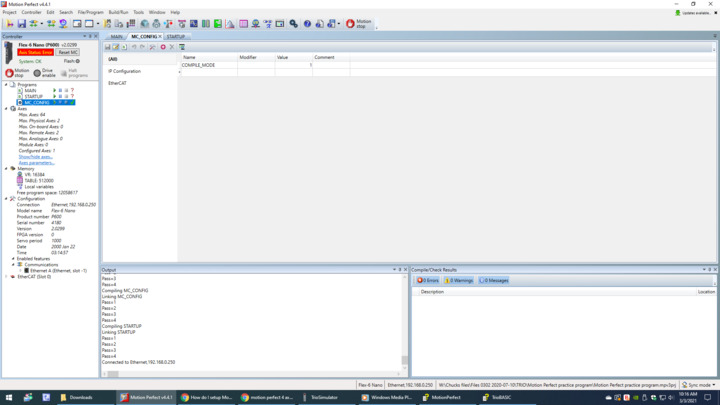
Ok new development, If I switch ethernet cord from Motion Bus In and put it in Motion Bus Out the axis error goes away but then the System: line below axis status says Error.
Is there something I'm missing here?
@MacroPc (Customer) the assistance here could be limited due to we do not sell any of the products that you have in your application.
To get a quicker response and/or help I would post your same question(s) in the below forum that has a broader user base:
http://www.plctalk.net/qanda/forumdisplay.php?f=2
ok thank you
Is your drive showing up in the 'intelligent drives configuration' at the top?
Also, you need to use Motion bus in on the AKD drive.
Yes it shows up and I am using Motion bus in. If I take ethernet cord out of Motion bus in and put it to Motion bus out the axis status switches to OK but then System switches to error.
After refreshing the intelligent drive page the error "Remote drive error" returns.
In your MC_CONFIG, add the following:
Also, you can get rid of the COMPILE_MODE entry unless you want to dimension everything. By default, all variables are 64 bit double precision floats.
A few questions:
P.S. Don't use Motion bus out anymore unless your daisy-chaining additional drives. Trio doesn't support any ring networks. I'm also assuming your drive is connected to the middle Trio Ethernet port. They're not labeled well.
ip is set to 192.168.0.250
I have no idea about workbench, I can only connect to my drive via ethernet and workbench only shows me serial ports.
Ethercat(0,0) shows:
EtherCAT State: Init (0)
EtherCAT State: Pre-Operational (0)
EtherCAT State: Safe-Operational (0)
EtherCAT State: Operational (0)
EtherCAT Configuration (0):
P600: 0 : 0 : 2000
AKD: 1 : 5 : 5 (4:0:0)
My drive is connected to bottom ethernet port, my pc is connected to top one, there is only those 2.
Your drive IP should be different from you Trio IP address. The one you listed (192.168.0.250) is the default Trio IP address.
Which version of Workbench are you using? There is no serial connection option.
https://www.kollmorgen.com/sites/default/files/public_downloads/AKD%20Servo%20Drive%20WorkBench%20GUI%20Standard%20Setup%20EN%20%28REV%202.7.0.5821%29.zip
(Latest)