Todd Dice (Customer) asked a question.
Analog input filtering.
I know this has asked before (from the old forum) and those posts were imported here but they're difficult to read.
Click C0-12DD2E-2-D. Analog inputs are NOT SET to continuous addressing.
Has anyone found a better method than this?
I ask as this code still suffers from a result at DF12 that bounces around more than I'd like
I found THIS WEBPAGE but not certain it's better, and rather than "trying it myself," I'd just cut to the chase and ask others here.
If you have, can you post that code?
Thanks!
-Todd
"bounces around more than I'd like"
That raises a couple of questions, how smooth do you want and how quickly do you want it. Also, what does the input data look like?
One could of course store and average a larger number of samples, though that could have some disadvantages.. Last time I looked, the specs forthe CLICK analog input gave a conversion time of around 50mS (though I haven looked lately, newer models could be faster) you could use the 100mS_Clock and 50 samples for about the same response time you have now. Whether or not the results would actually be better I don't really know, it might depend on the nature of the noise? I'm pretty sure that increasing the number of samples with your current 500mS timer would help, but it would slow response time, and as it may take a fairly large number of samples the response might be too slow, thus my first questions.
Response time is not really an issue. Taking more samples may be the answer. I'll give it a try.
Is this of any use.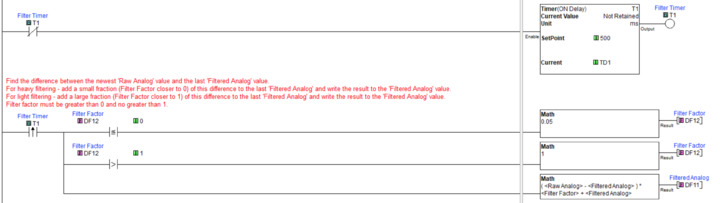
I'll give it a try, thanks!
Is DF12 always bouncy, or only at the start of 'the process?'
Does the bounce correlate to changes in the process value?
I'm "measuring" in millimeters. Sometimes, the spread from one measurement to the next is 15mm. I'm wishing I could tighten that up. The device is on, in its current state, works fine, but I just wish I could filter the "bounce" better. And before I get the "use a BRX or P1K" answer, I got almost 50 in the field with Clicks and this product must be low cost to remain viable. Thanks!
I was not going to attempt to steer you to any other hardware.
I was curious if the bounce is happening during a run or only at the start.
The thinking was that at the start, the averaging calcs may be working with a lot of zero values, leading to iffy results.
I am satisfied that bernie answered this question on the legacy forum. There was an attached pdf. Lost to the change! :(
Created Date: September 18,2013
Created by: bcarlton
At the expense of slower response you can run a filter in the Click. Check the attached PDF.
Edit - putting 0 in DS1 would provide no filtering at all.
Yeah, without the PDF...
First thing I would try before I do anything is put a multimeter or if you have one an oscilloscope right on the 2 wires going to the analog input so that you can observe for yourself what is going on. Quite frequently you find all kinds of signal noise issues in the first place. For instance is the wiring shielded? Is it grounded at ONE END ONLY (preferably the PLC ground plane)? Is the power supply (VDC-) grounded? If you are using multiple channels, are they all referenced to the same ground? All these will contribute greatly to noise issues.
Second look at your physical setup. Distance sensors vary quite greatly in their noise discrimination. Laser sensors don't like any amount of dust. Hitting a less than "flat" surface causes all kinds of signal bouncing issues. Low "SNR" such as hitting a rough surface to get a reflection is also a problem. Some of these you may be to overcome, others you may have to live with.
Look at the "type" of "noise". Is it jumping or pulses or just gaussian/random noise? Can you set up a program to log data and import a lot of data into Excel and perform some statistical analysis on it? By that I mean...everything is still. Take data. Plot the "bell curve". Make sure it's actually just white Gaussian noise. If not...you may have some work to do.
Don't forget Nyquist! If you are not sampling at a high enough rate, all bets are off. And for the purposes of the next step, sampling faster (up to the bandwidth of the digital conversion chip) may be best of all.
So now we are going to filter. First choice is linear or nonlinear. If you clearly have nonlinear noise...e.g., "pulses", then you have some work to do. The best known scheme for this is published in Numerical Recipes. Essentially you run moving average and standard deviations looking for "outlier" points. When you see one, substitute an average value of the surrounding points to remove the "spike". This is often done in video processing for the same reason. These types of filters work extremely well if you have nonlinear "spikes" in your data.
The other choice is linear filters. There are two issues to overcome with ANY filter. The first is that you don't get something for nothing! You WILL smear out and lose data with any filter. This much should be obvious but I can't overstate it enough. The goal is to remove as much noise as possible without causing this issue. The second is that you will cause a "delay"...slow down the response of everything. In linear filters we have 2 choices: FIR (finite impulse response) and IIR (infinite impulse response). IIR has the advantage of simplicity but it can take much longer to respond to a sudden change of inputs because it has an "infinite" memory where FIR has a finite memory so can respond more quickly but takes a lot more computation to be an effective filter.
As an example, let's just take a simple averaging FIR filter. So we take data samples D(t), D(t-1), D(t-2), D(t-3)....need to store these in a circular buffer. D(t) means the current sample, D(t-1) means the last sample, D(t-2) means the time before that, and so on. Now our output is simply (D(t)+D(t-1)+D(t-2)+D(t-3))/4 as an example for a simple averaging filter. You can weight the terms and do other things with the shape of the filter but this is a simple FIR filter. This is what the previous poster suggested. It works, it has some advantages, but it's fairly complicated to program.
Now IIR is even simpler. For a single pole filter we need a constant called alpha that is between 0 and 1. Now the output at time t is equal to output(t-1)*(1-alpha)+D(t)*alpha. So if alpha is say 0.1 (10%) then we average 90% of the last output plus 10% of the new reading. That's it! Basically you only need to store one value from the last calculation and run a simple one line math instruction to calculate the next value. Very simple to do in PLC's, PC's, etc. So like the FIR filter it takes several readings in a row for the IIR filter to respond to a change but from a program point of view you only need to store the last reading and do a very simple math problem to calculate the new output. I use IIR filters a lot on noisy inputs for this reason. More complicated IIR filters are of course possible such as daisy chaining two of them in series to make a 2 pole IIR filter. The other avantage of IIR filters is that they are exactly the same thing as analog filters (resistors, capacitors, and inductors) and the same math applies to them but in practice you can just tune alpha and get what you want in a couple minutes of programming and tuning.
Again and you can clearly see this, both the IIR and FIR filters will add filter delay (takes a while to respond) which can be a problem, and they tend to "smear" out data. So if you are for instance measuring distance to a static (not moving) target you are reading a constant value so other than the lag time, you can quickly get a very steady noise-free value. But if you are attempting to take readings on a moving target such as attempting to move to a specific position, filters will slow down this process because of the delay characteristics of the filters. MILD filtering is one thing but aggressive filtering such as setting alpha to 0.001 to take an extreme IIR example is going to cause you grief. And they will also "smear" your data so if you are for instance trying to take measurements on something by "scanning" it with a 1-D distance sensor, again it smears out what you are trying to do badly.
At some point you have to fix all your noise issues and/or measurement process if you have any prayer of making things work. Mild noise filtering is always a good thing. Heavy filtering is not. The big trick to this of course is determining where your noise sources are coming from and deciding whether or not it is significant enough to address it, and sometimes this takes some experimentation and testing to even figure it out.
In some really 'Dirty' situations, I've just hung a Cap on the Input Lines.. Change the Size to get the response you want..
Cap