Orion HE (Customer) asked a question.
Trying to send email. Getting RTE-41.
I'm trying to send some real-time alerts from a C-more EA9. When the alert triggers, immediately I get an RTE-41. According to the manual, this means:
"An incorrect SMTP address has been entered into the Panel Network dialog screen."
I've used the same SMTP address to send a test from a third-party website, so I feel the error message is incorrect. Does anyone have any suggestions on how to overcome this or at least rule something out?
Depending on your email server it could be another configuration problem. First see this App Note: https://support.automationdirect.com/docs/an-ea-013.pdf Some of it may be out of date relative to screen captures Gmail.
If you are using a Gmail account, usually it is an issue with "Less Secure App Access" being turned off. Google turns it off periodically it seems.
Make sure you have the Default Gateway entered correctly also. That is a common issue also.
Have you checked the DNS server addresses?
Garry
https://accautomation.ca/series/c-more-hmi-series-panel/
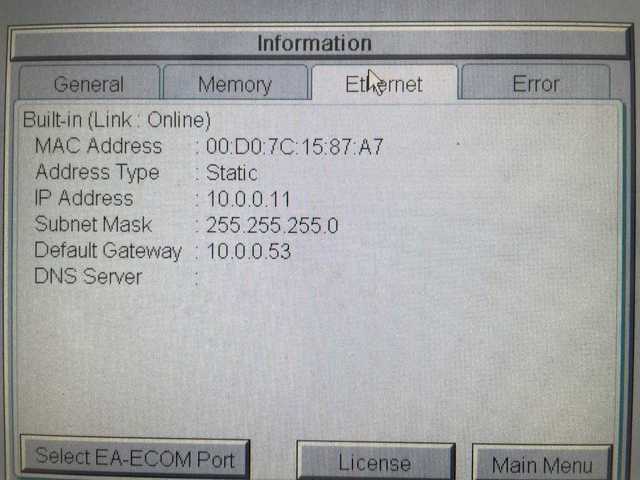
I had entered in all of the IP configuration information correctly and completely. I even loaded the project into a bench test unit here at the office and successfully received emails from the panel. Upon further investigation using the "Panel Menu" (hold upper left corner), we discovered that the touch panel in the field didn't have the DNS information stored in the panel, all blanked out.
We factory reset the touch panel and reloaded the project. No luck, DNS still blank.
I had this occur once last year at a different facility. Today I filed an official support ticket for the issue of DNS info being scrubbed in the panel. Unfortunately, I can't remember how I solved it before. But my ideas are power cycle and/or clear memory, since factory reset does not do what one thinks it might do.
I have seen this once recently also. I can not duplicate this now in the same panel. We will continue to try to duplicate.
The times I have seen it, there were many project transfers to the panel without rebooting. It's as if there is portion of memory that is growing every time you write the project to the panel and it's exceeding the normal bounds encroaching on the memory space where the DNS info is stored.
That may be completely impossible and dumb to suggest. I am not qualified to theorize on it, but I figure I'd try anyway.
Worth testing and considering.
I figured out when I was seeing it blank.
If I set the DNS Server to "Obtain DNS Server Automatically" it does not show on the System Screen or in the Panel Information. This should not happen, but I think it is an old issue.
I have email setup going through a gmail account using the server name "smtp.gmail.com" and it works. If DNS was not set, it would not work with the server name, I'd have to have the IP Address.
So if you are using "Obtain DNS Server Automatically", then that may be why it is blank. But it sounds like you are using a static IP address, is that correct?
Yes. I entered the Google DNS IP addresses as our ewon doesn't have DHCP.
Could it be a timeout issue? I ran test on retrieving DNS from google last weekend because we put in a fiber connection, (so I did a bunch of testing)Google was actually very slow in my opinion and the software I used agreed. I plan on changing DNS servers soon looking for faster.
Just a thought.
The panel itself loses the DNS settings I gave it. It's a weird, rare issue. The DNS Server field should say "Use following Address", and then display 8.8.8.8 and 8.8.4.4. Instead it's blank. Good suggestion though. wonky DNS servers could be a problem.