Zarnold (Customer) asked a question.
Help Integrate Lenze i550 VFD Ethernet/IP
Using productivity 2000 550cpu. Trying to integrate a Lenze i550 VFD using Ethernet /IP.
Tried importing eds file (vendor does not understand why it does not work).
I can use explicit Read command and get data, Could not Write Data.
Suggestions?
Can you attach a copy of the .eds file and/or provide the material number of the drive?
Its an i550 drive 16064433 or type i55ae137a10v01000s Using Ethernet/IP com module
The ZIP file has two eds files the new version they sent (DM) does not crash but wont function.
Photos Attached show the Arrays I created using the new EDS file.
I enabled the message enable I get nothing on Input array and the Config array is empty as well 0x0.
Last photo is the sample "generic " adapter with in RsLogix. Which is where I got the array size of 73 input , 23 out put and 130 config
the 73, 23, and 130 are assembly instances not array sizes. The input (Drive to PLC) has a assembly instance of 73 and the PLC will receive 3 16 bit ints. The output (PLC to Drive) has a assembly instance of 23 and the PLC will send 3 16 bit ints. The config data assembly instance is 130 with 0 8 bit ints
In the pics you posted you have status header selected i am not sure if you need that selected you will have to try both ways and you need to put those assembly instances filled in.
see help topic P259 for more on how to set up Ethernet IP.
this video is also very good
https://www.youtube.com/watch?v=OLmhO_iTYhw
z28z34man
Thanks for the response. The Ethernet/IP devices I'm familiar with are IOlink masters which you create the array and then read specific words or write to specific words.
So Im not sure how set up this Client based on the assembly Instances. Could you be a little more specific for me?
Thanks in advance for your help
In all the pictures you posted there is a box that says assembly instance / connection point that is where you enter the 73, 23, 130
z28z34man
Now i feel a little silly! As soon as you sent that I instantly recognized it. Thanks for pointing that out.
z
Let me know if that works or not. I don't have a lenze 550i to test with but will see what i can find
z28z34man
Rebuilt the Ethernet/ip Client as photo will show. I got a new error which I think is based on the array size I created. Just don't know enough about this side of things to find the solution. Contacted vendor again their looking into it but have not responded yet. Maybe im thinking bout this wrong. I expected the system to function similar to Io link Ethernet/ip clients where read date comes up in the input array, values I want to write would be in the output array.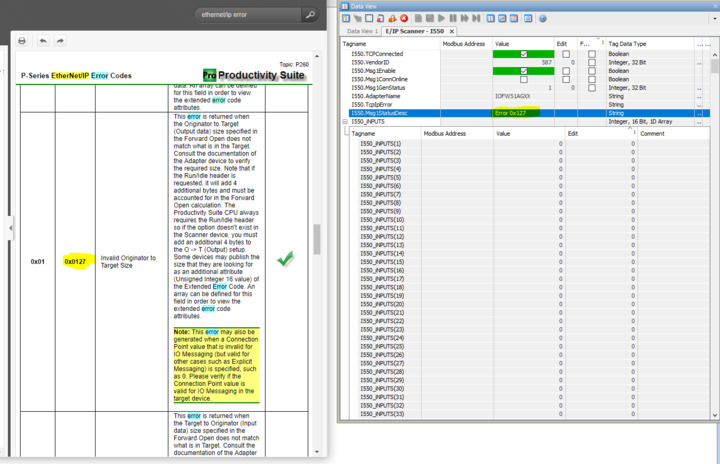
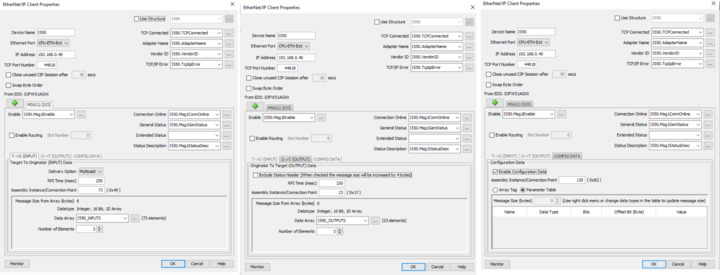
Have you tried with and without the include status header box checked?
z28z34man
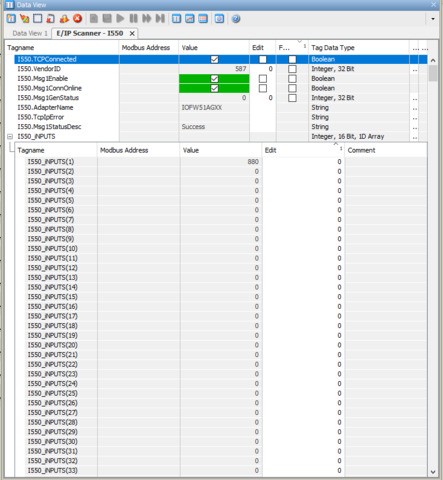
I tried that and looks like were having some success. Were no longer reading errors and in the 1st data word Im reading 880. Its reading something. Bets results since I started with this issue. Thanks.
Z