
PaulD (Customer) asked a question.
Hi,
Using Click PLC I would like a timer (T1) to activate something when it turns off. You push a momentary on button that signals X1. X1 then starts T1 which runs for 10 seconds. When that 10 seconds is up, how can that signal something else?
Using Click PLC I would like a timer (T1) to activate something when it turns off. You push a momentary on button that signals X1. X1 then starts T1 which runs for 10 seconds. When that 10 seconds is up, how can that signal something else?
Thanks, I did search and read similar questions but all the attachments are gone.
use a NO contact with the address T1.
I'm using T1 to operate something for 10 seconds. After the time is up and that shuts off I want that to trigger another operation.
In that case, use a negative edge trigger off the t1 bit, using an "OFF Delay" timer instead of "ON Delay". T1 will stay on for the 10 seconds, turning on y001, then on the off transition of t1, c1 will turn on for one scan. You can use a latch instead of an output coil if need be.
It will only stay true for one scan, but if you need more than that, use a latch coil, then be sure to reset it when done.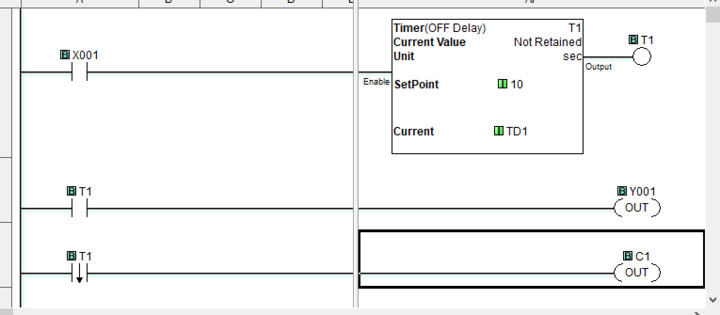
The way a timer works, in the TON mode, when the timer is energized, the output bit remains off until the timer has reached the setpoint time. Then, it remains on until the timer is not longer energized.
+1 David_H
Hi PaulD,
A timing chart would help to determine the logic.
https://accautomation.ca/the-secret-of-using-timers/
Here is the timer in the click plc.
https://accautomation.ca/click-plc-timers-and-counters/
Regards,
Garry
Does this help?
Hi Paul,
This does help.
Take a look at the following logic.
When the pushbutton is made it will set an internal bit (C1). This will be used to tell when the timer starts. (10 seconds)
If we have C1 and not the timer then output Y1. (On for 10 seconds)
If we have C1 and the timer then set C2 - Next operation. We also reset C1.
I hope this helps you out.
Regards,
Garry
I struggled with how to use timers at first. Here's a very simple idiom to get you going.
Thanks, I've never used 'copy' before so I will have to read up and see if I can figure it out. I've been away from PLC's for a while and I was never an expert.
Thanks Garry, that's exactly what I am trying to do. 👍