
jaschenbrenner (Customer) asked a question.
How to process absolute encoder wrap around
I'm using an 11 bit absolute encoder to detect the position of the spindle on a welder. I'm using a PID loop with time proportional control to pulse the spindle motor having it slow down as it approaches the new set point. If the new set point cause the encoder to pass the 2047 it re starts from zero.This causes a problem with the PID control. The PID calculates a large error as it should because zero is much further from the set point than say 2047 counts. I need the PV counts to continue up until this set point is reached and then I can resume using the true encoder (pv) counts. Any help is much appreciated. I'm using Productivity Suite software and P1000 series PLC
Is there anyway to ensure that the encoder when passing 2047 will go to 2048, 2049, etc? When the movement stops then you can read the true value of the encoder.
I'm not sure how you have the inputs wired or if you are using Grey or Binary code on the encoder.
Just a thought.
Regards,
Garry
https://accautomation.ca/series/productivity-1000-plc/
Not sure this is the 100% correct solution but my thought would be to make sure rotary encoder rollover position is deselected to use it as linear, and to use a tag to reset my count.. Another thought would be to use the Z-input Reset count to create a addition to the pulse count so you would have z-input reset count to = 360 if it's a 360pp/r encoder then use math to add the new pulses and the z reset count together. just a thought have never tried it.
Brian
Hi Brian,
They mentioned having an 11-bit absolute encoder. This would not have the Z-phase as you mentioned. He would have to do something like monitor the input channel and when the count is 2047 and goes to 0 he would add 2047.
https://www.motioncontroltips.com/faq-what-is-the-difference-between-absolute-and-incremental-encoders/
Regards,
Garry
I appreciate the ideas. Garry is correct. I have an 11-bit absolute encoder. No Z-phase. Maybe capture the previous count and if it was 2047, set a flag. If the flag is true, PV=counts+2047? Reset the flag when performing a new increment.??
Sounds like a plan.
Capture the previous count and if it was 2047, set a flag. If the flag is true, and the count is less than 100 then PV=counts+2047. If the flag is true and the count is greater than 1500 then PV = counts. Reset the flag when performing a new increment.
This way you are giving a range to work.
Regards,
Garry
https://accautomation.ca/
I'll let you know how it goes next week on Tuesday. I'm heading out for the weekend. Thank you guys for the input. It always helps me to learn.
How fast is your encoder turning?
With an absolute encoder the 1st bit is going to turn off and on every pulse of the encoder.
So for 1 it is on and 2 it is off and 3 it is on again.
You can count the rising and falling edge of the first bit input using a counter to keep up with pulses and use the counter pulses for the position. 2047 per revolution.
But if it goes over one revolution the counter will keep counting.
When the position is done reset the counter.
You never have to worry about rollover.
Again if speed is not an issue.
I might have forgotten to mention the output of the encoder (TRD-NA2048NWD) is gray code. So, I can't count the LSB because it does not change every count. My encoder is turning at 8 RPM. I'm sorry for failing to mention the gray code part.
Are you using the Absolute encoder instruction to bring in the encoder?
What word are you bring the count into?
You can still use the first bit of that word to create your pulse since your count will always count up by "1" regardless of the input pattern. So instead of using the Physical input bit address use the bit of word.
For instance if tag name is Encoder_Input use Encoder_Input:1 to increment the counter.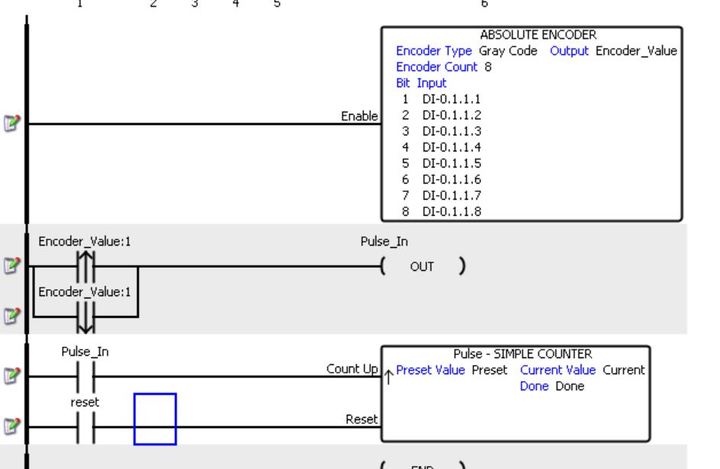
Yes, I am using ABSE Absolute Encoder instruction in Productivity Suite. The output is stored in a 16 bit word as type integer with the tag name Encoder Counts. What you say makes sense. Now I need to figure out how to examine the first bit of that word instead of the physical LSB bit 0. I appreciate your help with this.