
WilK (Customer) asked a question.
Click PID manual/auto switching
I'm running into the problem setting up multiple PID's.
It seems that no matter what address block is used for each PID, every second PID loop that is entered does not switch into Auto mode, also the alarm settings are disabled.
I.e. PID001, PID003, PID005, PID007 works fine
but PID002, PID004, PID006, PID008 will not swich into AUTO mode.
All PID's setup the same with and consecutive Parameter areas.
Changing parameter areas does not help.
After deleting PID's 2,4,6,8, PID's 1,3,5,7 still work fine.
I don't know if this is a PLC or programming software issue.
Hi WilK,
When setting up the parameter areas, did you use the "Find Available Addresses..." for each loop?
Have you tried changing the name to the next odd number instead to see if that works?
Just some thoughts,
Regards,
Garry
https://accautomation.ca/click-plc-pid-instruction-and-autotuning-using-factory-io/
Thanks for your quick response.
No I did not use the "Find Avail...".
I started with C200, DS200, DF200 for the first PID Loop, all other PID's memory blocks after that.
At this point it was a test of the problem. There was no Ladder program, just an END statement in Rung 1
Hi WilK,
I cannot duplicate your situation.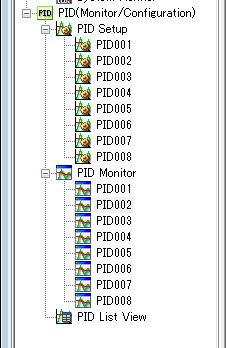
Attached is the program.
Regards,
Garry
New Test
I was out of town yesreday.
I loaded and run your test program and it worked fine.
I attached my program which is the same except my address block range starts at 200.
It has the problem not working on every other loop.
Thanks
Wil
PID Loop C DS DF
PID001 200 200 200
PID002 240 215 225
PID003 280 230 250
PID004 320 245 275
PID005 360 260 300
PID006 400 275 325
PID007 440 290 350
PID008 480 305 375
I'll let someone from AD respond to this. It looks like everything should work.
Regards,
Garry
I think I see the issue.
Are you looking at the Mode in the PID Monitor? If I put in two PID loops, the second loop does not indicate it is in Auto Mode in the PID Monitor. But if I look at the DataView, the PID AutoMode Indicator bit is high indicating it is in Auto Mode.
This looks like a bug in the PID Monitor.
-------- Original message --------From: Community Admin <communitymod@automationdirect.com> Date: 9/10/20 16:28 (GMT-05:00) To: wkantus@gmail.com Subject: ADC_HMI_CLICK_PE answered you: Click PID manual/auto switching
@media only screen and (max-device-width: 480px) {
html { -webkit-text-size-adjust: 100%; }
table.container { width: 100% !important; }
.hidden-for-mobile { display: none !important; }
.callToAction, .callToAction td, .footer {
font-size: 12px !important;
}
.button .text { font-size: 12px !important; }
.defaultIndentation { width: 10 !important; }
.text { font-size: 12px !important; }
a.button { width: 96 !important; }
a.buttonWide { width: 118 !important; }
a.buttonAuto { padding-left:1em !important; padding-right:1em !important;}
a.button, a.buttonWide, a.buttonAuto {
height: 23 !important;
line-height: 23px !important;
border-radius: 4px !important;
-webkit-border-radius: 4px !important;
-moz-border-radius: 4px !important;
}
td.buttonWrapper {
width: 98 !important;
height: 23 !important;
}
img { display: inline !important; }
.circle { border-radius: 50%; clip-path: circle(50px at center); }
.square { border-radius: 10%; clip-path: circle(10px at center); }
}
@media only screen and (min-device-width: 600px) {
table.container { width: 600px !important; }
}
@media screen {
@font-face {
font-family: 'Salesforce Sans';
font-style: normal;
src: local('Salesforce Sans'), local('SalesforceSans'), url(https://community.automationdirect.com/fonts/SalesforceSans/SalesforceSans-Regular.woff) format('woff');
}
}
a, a:visited { color: #015BA7; text-decoration:none; }
img { display: block; }
.preheader { display: none !important; }
table {
border-collapse: collapse;
mso-table-lspace: 0px;
mso-table-rspace: 0px;
}
I think I see the issue.
Are you looking at the Mode in the PID Monitor? If I put in two PID loops, the second loop does not indicate it is in Auto Mode in the PID Monitor. But if I look at the DataView, the PID AutoMode Indicator bit is high indicating it is in Auto Mode.
This looks like a bug in the PID Monitor.
[Image: CLICK PID Auto Mode]
ADC_HMI_CLICK_PE (AutomationDirect)
I think I see the issue. Are you looking at the Mode in the PID Monitor? If I put in two PID loops, the second loop does not indicate it is in Auto Mode in the PID Monitor. But if I look at the DataView, the PID AutoMode Indicator bit is high indicating it is in Auto Mode. This looks like a bug in the PID Monitor. CLICK PID Auto Mode
View/Answer
or reply to this email
Replying to
WilK (Customer) asked a question.
Wednesday, September 2, 2020 1:20 PM
Click PID manual/auto switchingI'm running into the problem setting up multiple PID's.It seems that no matter what address block is used for each PID, every second PID loop that is entered does not switch into Auto mode, also the alarm settings are disabled.I.e. PID001, PID003, PID005, PID007 works finebut PID002, PID004, PID006, PID008 will not swich into AUTO mode.All PID's setup the same with and consecutive Parameter areas.Changing parameter areas does not help.After deleting PID's 2,4,6,8, PID's 1,3,5,7 still work fine. I don't know if this is a PLC or programming software issue.
ADC_HMI_CLICK_PE (AutomationDirect)
I think I see the issue. Are you looking at the Mode in the PID Monitor? If I put in two PID loops, the second loop does not indicate it is in Auto Mode in the PID Monitor. But if I look at the DataView, the PID AutoMode Indicator bit is high indicating it is in Auto Mode. This looks like a bug in the PID Monitor. CLICK PID Auto Mode
Thursday, September 10, 2020 4:28 PM
You're receiving emails when someone "Comments on my posts."
To change or turn off Community email, log in as wkantus@gmail.com.adc.
Are notifications about this post getting annoying? Reply to this email with the word " mute
".
3505 Hutchinson Road, Cumming, Ga. 30040