
acutm (Customer) asked a question.
Hello. I'm trying to set communication to an EDWARDS gauge with RS-232 and ASCII message.
I'm using a Productivity P2-550 with a P2-SCM module.
I'm not an expert on the field and I'm not quite sure what I am doing wrong here.
From the gauge manual, this is a brief explanation on how the communication works:
- The communications to the gauge operate on a master / slave principle. The gauge is the slave and will only transmit a message in response to one sent to it. The master, a PC for example, must always start the conversation.
-
- A conversation consists of a message to the gauge and its response back. Having sent a message to the gauge, wait for the reply before continuing.
-
- There are two basic types of message sent to the gauge:
-
- Command sending information to the gauge (!)
-
- Query requesting information from the gauge (?).
So, if I try to get the gauge identification for example, string should be ?S751.
What I did was first configure the device with 9600 baud, parity none, 8 data bits, and 1 stop bit (found all these on the device manual)
Then I added an ASCII OUT function, making a string variable containing the value required and send it.
Problem is that from the monitor view, I can set the string and send it. It replies turning on the COMPLETE boolean, but I don't have any actual response from the device. And I'm not even sure what to expect. will it be the variable itself that will change giving me the answer?
I've also tried the ASCII IN but it doesn't sound right to use it because of the description from the manual.
I'm not getting any error, timeout, failed or related. Everything looks like I'm doing the right thing. but I'm not 😭
Any suggesions?
Hi acutm,
Since this is a master / slave configuration, you will have to send the ASCII output and then use ASCII input for the response.
The above is from a working example of Modbus ASCII protocol. It is also a master slave type configuration.
Once the information is sent (ASCII Out) the flag bits of the instruction are used to trigger the receive communication. (ASCII In)
I hope this helps you out.
Regards,
Garry
Hi Garry thanks for your response!
I tried doing what you suggested but I'm still not getting any response.
Here's my scheme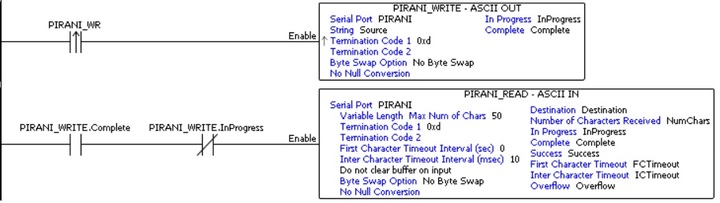
And my data view
Please note that when I enable the ASCII in module, it keeps showing "In progress" boolean on, but it never completes the dialogue. is that normal? I tried clearing buffer, and without it, same result.
The gauge manual shows the format of the message to be considered:
|?| |S| |n| |n| |n| |cr|
It also says " Messages not enclosed by start (#, ! or ?) and end (cr) characters will be ignored. Incomplete messages will be ignored if a new start character is received"
So that's why I only set a termination code 0xd for input and output.
I'm afraid of sending a wrong message format and not having response because of that.
Hi acutm,
Your program looks OK. The only thing that I would change is on the ASCII IN instruction change the first character timeout interval (sec) to 1. This will give the unit time to get a reply back.
I would just verify the parameters that you have on the serial card with EDWARDS gauge RS232 parameters. 9600, none, 8, 1.
Regards,
Garry
Apart from the coding part. this is the correct connection scheme, is it?
Supply voltage is not connected directly as supply for the gauge is 15v and SCM module provides 5v
Try tying the common/logic ground wire to 0 VDC.
Can you make it work in hyper-terminal? (Check the manual before plugging it into a PC serial port. )
There are a couple of cost effective serial spy/sniffer products out there that make trouble shooting comm issues much easier. They may be worth getting if you do much serial comm stuff.
You may need to switch the TX/RX. I believe the PLC is DTE.
I don't know if the gauge terminals are labeled for connection to a DTE or a DCE device. It should say in the gauge manual.
Thank you so much for your answers! I've been a little busy so I'll give an update after this weekend when I get on it.