
chrisz (Customer) asked a question.
I have lost communication with a DL06. I was making programming changes today from my laptop. Everything was going well. After my last change, I lost communication.
The power & run LEDs are on. The CPU LED is off. The TX/RX LEDs show no activity. The PLC normally communicates with a C-More HMI. I can't get communication between the HMI and the PLC either. Any ideas?
Strange, "everything was going well...I lost communication". 'Power & run LEDs are on. The CPU LED is off". That is correct. I will assume you are using the RJ12 Port, Port 1, and using a USB-Serial adapter. A couple thoughts. Verify that Windows lists your USB-Serial adapter in the Windows Device Manager, and that the Properties lists that "This device is working properly". Check the Comm Port that is assigned to the adapter. With no software open, the RX1 LED should be green. When you open DSLaunch, TX1 and RX1 should blink. Do you see any Comm Links highlighted green? I assume that you do not have any Comm Links highlighted green. Right click on your link to bring up the edit box. Is the correct PLC listed? Is the device set to your correct Comm Port? Are comm settings: 9600, Odd, 8, 1, none? Radio Link is not checked? Is Protocol set to K Sequence? Address set to 1?
You also say " I can't get communication between the HMI and the PLC either". Are you using the same port? Port 1? Or is HMI connected to Port 2?
If you're using Port 1 for both, try to connect to the PLC using Port 2. Are you able to connect using Port 2?
Your assumptions about the port & adapter are correct. It is working correctly in device manager. With no cable plugged into Port 1, the RX light is on. I plug in the comms cable and the light goes out and no TX either. This PLC normally communicates with a C-More HMI. I get the same results when I plug the HMI in to that same port.
I would reboot your laptop. Make sure it's a clean reboot.
Q1: What COM port does your PC think the USB to Serial Adapter is using? COM1? COM9?
Q2: What COM port is your DirectSOFT Communications Link configured for?
These should match.
If they match, go in to edit the comm link and hit the [Auto] button and see if it can find it by running through the various serial settings. Monitor the TX1/RX1 LEDs on the PLC and describe what you see if that did not fix it.
PC thinks it's COM6. DirectSOFT Communications Link is configured for COM6 as well. Ran through the auto function. RX1 flickered a couple times. TX1 never showed signs of life. Switched USB ports on my laptop for fun with no success.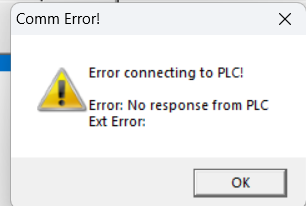
I recommend calling ADC Tech support directly. They have a good idea of what could be going wrong with your laptop.
Yes, ADC Tech support second to none. Also, it may be helpful to know if you can connect to the PLC Port 2 with your PC USB port and serial adapter. You may need to use Auto in the link setup as you may not know port 2 comm. settings. Or, if available, try to connect to the PLC using a Comm. module.
Yup. Thanks for the help. I did call tech support. It appears Port 1 is bad. I don't have the adapter for Port 2. That seems the next step.