
RomRP (Customer) asked a question.
Hello from Brazil!
We got on our processing line since 2000 DL06 PLC as our main controlling unit. It is still working fine. I am trying to make the port 2 work. Below we have the schematics for the 15 wire conector:
I soldered wires to pins 6, 7 ( 8 ), 9, 10 and 13. Joined 6 to 10 and 9 to 13 while adding a 120 ohms resistor, soldering its legs to each join. In the end I had a 3 wire coming out from the conector, a 6+10 join, a 9+13 join and a 7 GND. I tested all my solderings, all my connections coming out of it on the other end of the cable. All fine, all done correctly but NO MODBUS. Inverted the connections A and B to test. Nothing. I am wondering if I need to jump RTS+ to CTS+ and RTS- to CTS- while at it, because I don't know what else to do.
Please help,
Rom Pereira
I am guessing you are not using hard-wired hand-shaking, so yes, jumper RTS+ to CTS+, and RTS- to CTS-.
The ports at each DL06 also need to be configured. (I assume you want two DL06s to communicate?)
Thank you for your reply K Price. I want to get some information from the DL06 connected to a nodered on a server using a USB adapter for RS485. The port 2 was configured prior to the test, with 19200 / N / 1, using only modbus protocol. Thank you, Rom
when you say "and a 8 GND", I assume a typo? Pin 7 is Signal GND.
Once again thank you for your reply K Price. I attached the description of the pins for the communication ports. It says there that 7 and 8 are ground I guess. I just checked again my schematic (I also attached it) I used pin 7 for ground, not 8 as I said before... Thank you, Rom
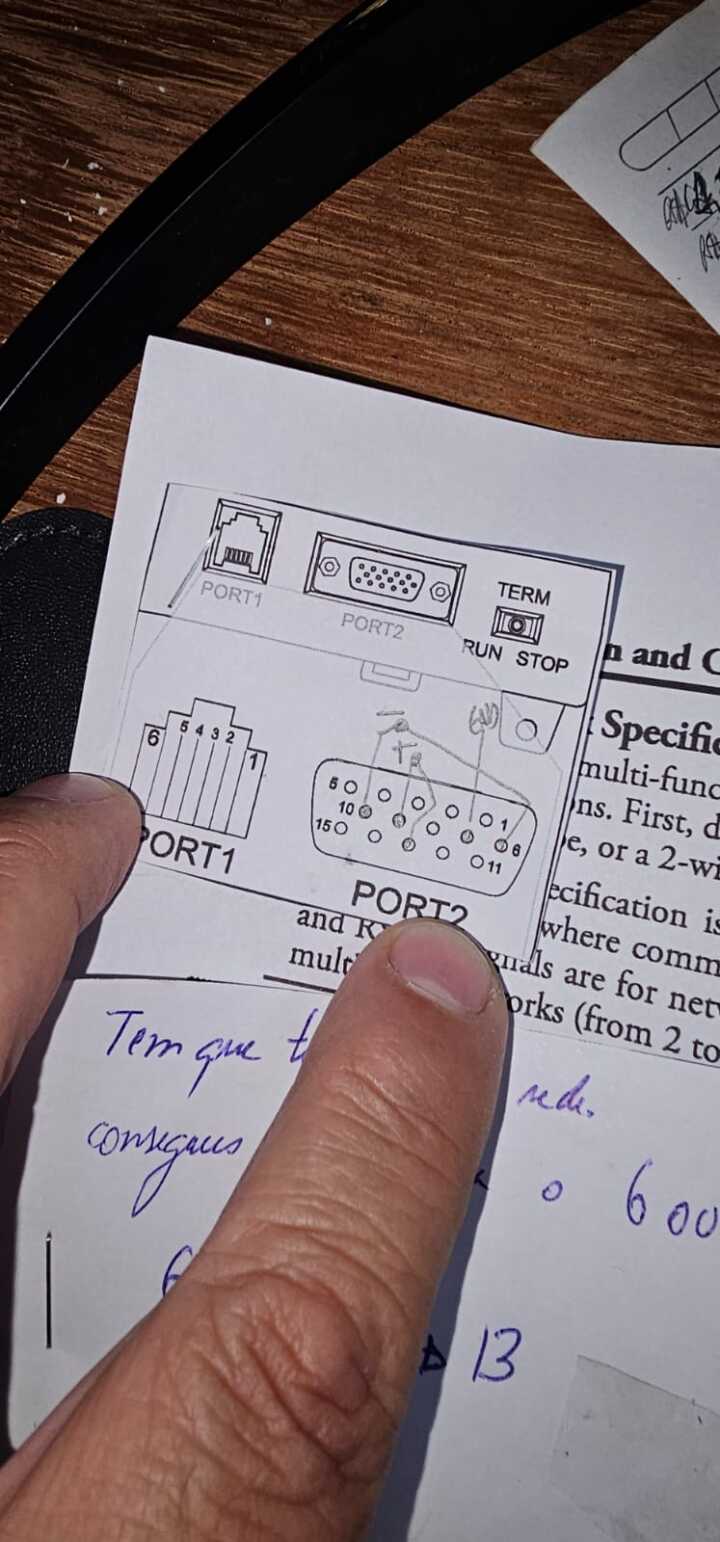
The question is, do I need to jump to connect to a server with nodered using a RS485 to USB adapter? both sided are terminated with 120 ohms resistors. Thank you.
Perhaps you already do this. I like testing the communications. WinTECH software (win-tech.com) ModSim and ModScan can act as a master or a slave individually.
Dear K Price, thank you once more for your reply. The cable is tested (with the multimeter) and the adapter too. I will solder the jumpers to the pins: pin 11 to pin 14 and pin 12 to pin 15 and test it again.
I'm assuming you have a USB-to-RS485 adapter, possibly you have USB-RS4X-1. For RS485, at the adapter end you just connect the (3) wires, DATA+, DATA-, GND. There is a DIP switch to add a termination resistor, or not. You still jumper RTS+ to CTS+, and RTS- to CTS- at the PLC end.
A part of the Modbus comms that trip me up is the Modbus method and calculation for Modbus addresses. Just ran a quick test. The comms were actually working, but I did not know it because I initially calculated the Modbus address incorrectly. I have a USB-485M connected to the laptop, a ZL-CMA15 connected to the DL06 Port 2, RS485 red wire connected to T+ and jumpered to R+, RS485 green wire connected to T- jumpered to R- (no terminating resistors, no signal ground wire). Using WinTECH ModScan to poll V-memory. For example, (using above configuration) ModScan address 41089 = DL06 address V2100, (example of 584/984 mode on page 4-17 of DL06 manual). Entering BCD/Hex into V2100 (10 for example) will display a decimal value (16 for example) in ModScan 41089. (using 9600, 8, Odd, 1, no flow control)
If still having problems, you could try the above configuration, possibly help narrow down problems.
Dear K Price.
First and foremost thank you for all your efforts.
After I change the connector making the jumpers, all worked fine.
For future readers, here goes the complete answer:
NOTE: I was told yesterday that the term "jumper" or "jumped" I used below is not suited to a connection between two different pins. The correct term is "looped" since you are looping two different pins that do differente things.
I got a regular D-Sub 15 pins VGA conector, male. Based on the schematics from the manual, for 2 wire RS485 RTU communication using modbus, I soldered the following:
step 1: I soldered pin 9 to pin 13 and soldered to a red wire, marking it as + (positive)
step 2: I soldered pin 6 to pin 10 and soldered to a orange wire, marking it as - (negative)
step 3: I soldered pin 7 to a black wire, marking it as ground
step 4: then I jumped pins 11 to 14 (soldered to each other)
step 5: then I jumped pins 12 to 15 (soldered to each other)
Important: if you need to terminate, solder a 120 ohms resistor, one leg in step 1 and another leg in step 2.
Then I connected the red (positive) wire to port A+ in the waveshare USB to RS485 adapter, the orange (negative) to port B- and the black wire (GND) to GND port on the adapter. Again, if you need to terminate the 485 network, add a 120 ohms resistor between ports A and B here.
Photo of the adapter:
To test it, I created a simple flux with a modbus getter, configured it with the ID that you set on the port 2 of the DL06, I used operation FC 2, address 2048 (X0) and quantity 1, as follows:
I hope this helps, thanks again K Price for your help and support,
All the best,
Rom Pereira