
Brktman (Customer) asked a question.
I need to add a counter to a timed drum to a Click pic. I have an input photo switch that I want to count up. Can anyone give me an example of code and the best way to add it to the timed drum? I have added a new step to DS2 along with the input but can’t
Click PLC- Counter in a timed drum
Hi Bldrguy,
It sounds like you need to add this to the enable line of the Drum Instruction.
The enable condition will compare the current step and if equal will open up. A counter contact will then be used in parallel with this compare contact.
https://accautomation.ca/click-plc-drum-instruction/
I hope this helps you out.
Regards,
Garry
https://accautomation.ca/series/click-plc/
Thanks Garry,
I have watched the video before, that is what got me this far. How do I add the contact counter in parallel with the enable condition, and what would that code look like? That’s where I’m having trouble.
Could I add a new step feature and add the counter contact in parallel with that instead?
Not knowing exactly what you want, I believe Garry is describing something like this:
Am I even on the right track? Notice the error. This sequence needs to start after step 5 in the middle of the drum, count up to 8 then continue to step 6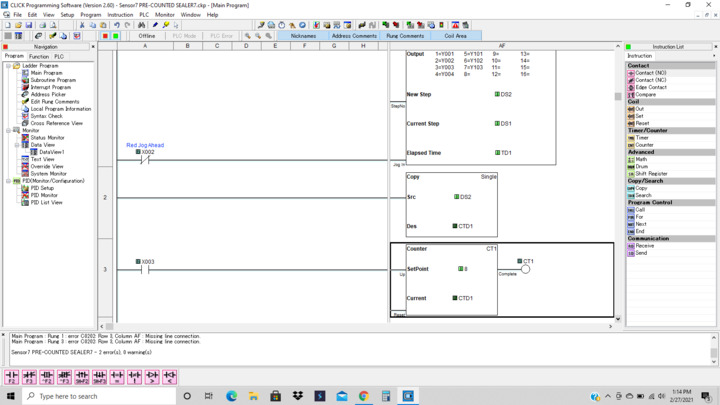
First error has to do with your enable to your drum, and second is you're missing a line of logic to reset your counter.
To do what you ask:
You can winzip your code, attach, and I or another can give some assistance.
+1 Todd
If you attach your program we can take a look at the errors that you have.
Regards,
Garry
https://accautomation.ca/series/click-plc/
Does this look correct now? I don't get any errors when checked. Sorry I couldn't get all the code in one screen shot. Thanks for the help!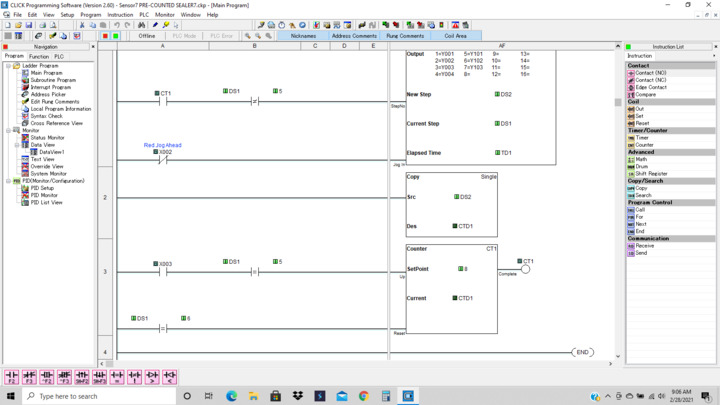
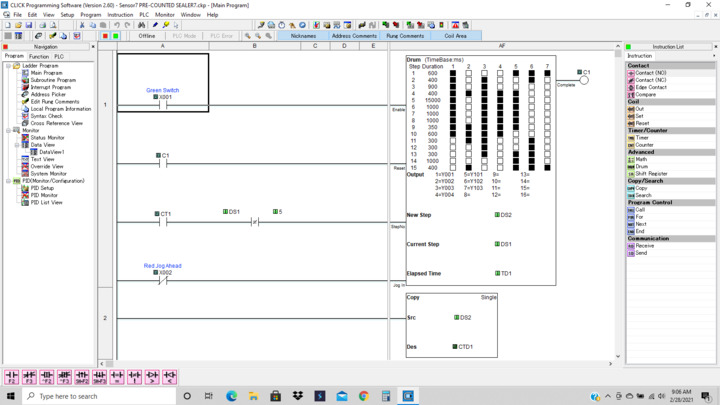
Your CT1 contact should be in parallel with the compare contact. This should be on the enable rung for the Drum instruction.
If you attach your program we can look at it.
Regards,
Garry
This must still be wrong as now I get an error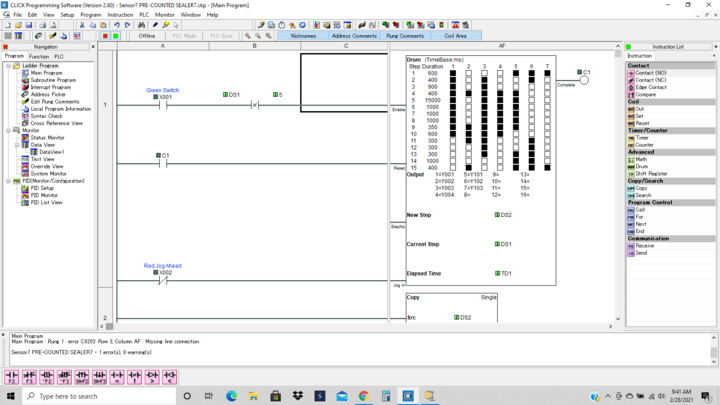
Please see file attached
Sensor7 click file