rjm21 (Customer) asked a question.

C-More Micro with Fanuc R-30iA Robot

Hoping someone has some experience with Fanuc Robots. Our company recently purchased a second hand Fanuc R-30iA Robot arm. Looking to add a C-More micro EA3-T4CL just to read certain values.


From the Fanuc manual: " HMI Device communication function. This function communicates with a HMI device by that the robot controller pretends to be a GE Fanuc Series 90 PLC."

This seems fine, as the C-More Micro HMI can communicate via SNPX protocol with GE Series 90 PLCs. And Google searches have turned up a couple of forum posts that the Robot does in fact do this.


What I'm most confused about is the wiring between the Robot and the C-More Micro. The serial port on the Robot is a special 20 pin port that is software selectable to communicate via RS-232C or RS422.


When using the SNPX protocol, will the C-More only accept RS-422, as indicated by the cable diagram? Or will it also accept RS2--232?


The reason I ask is the Pinout diagram for the Robot serial port doesn't list standard RS-422 pins such as RXD+, RXD-, TXD+,TXD-.


Pinout diagrams attached for reference. (Edited to upload higher quality version of the Fanuc Serial Pinout List)Fanuc PinoutC-More Pinout 15PinC-More SNPX CableFanuc Pinout


  • rjm21 (Customer)

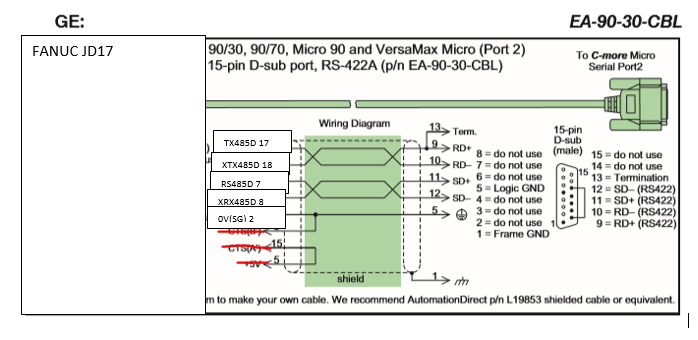
    To anyone in the future who may run into this, we had to purchase and install the HMI SNPX option from Fanuc Robots. Attached is the makeshift serial communications cable I had to make. FanucWiringSerial
    Selected as Best
  • Garry (Customer)

    Hi rjm21,

    Thanks for all of the information.

    It looks like RXD+, RXD-, TXD+,TXD-. are the same as RS485D, XRX485D, TX485D and XTX485D.

    These 4 wires and the SG should be what is required.

    http://therobotguyllc.com/wp-content/uploads/2019/08/R30iA-Mate-Controller-Maintenance-Manual.pdf

    The above manual will shows the RS232 for the Fanuc R-30iA and not the RS422. See page 170.

    Looking at the C-More micro software, the port selection is Comm. Port 2 but it does not specify if you can use RS232 and/or RS485/RS422.

    I'll let automation direct weight in on the driver and signal going out the port.

    Regards,

    Garry


    https://accautomation.ca/series/c-more-micro-hmi/

    Expand Post
    • rjm21 (Customer)

      Thanks Garry.

      That was my hope that the RS485D, XRX485D and so on was what I need for RS-422.


      I wonder if the manual you linked is for a different year. If you look on the diagram of page 88, you'll see the JD17 serial port lists RS-232-C/RS-485.


      We received a CD-ROM of the manual for our specific robot. I was able to find a procedure to go into the software and select what RS communications type I want, so not too worried about that. Just the wiring.


      It'll most likely be trial and error matching the pins.

      Expand Post
      • Garry (Customer)

        It usually is trial and error when the connections are not exactly clear.

        Make sure you use the jumper on the C-More side. 10 to 12

        I would not connect any power pins on the robot side.

        Just some thoughts.

        Let us know how you make out.

        Regards,

        Garry


        Expand Post
    • rjm21 (Customer)

      Thanks for the reply. I do have this picture handy for my reference.


      More specifically my question is what RS communications the EA3-T4CL is looking for when using the SNPX protocol. I know it can only communicate through the 15 pin port 2. But do I have the option to use RS-232 or RS-422 or RS-485 based on how I wire the plug?

      Expand Post
  • rjm21 (Customer)

    To anyone in the future who may run into this, we had to purchase and install the HMI SNPX option from Fanuc Robots. Attached is the makeshift serial communications cable I had to make. FanucWiringSerial

    Selected as Best
    • Garry (Customer)

      Thanks for the followup and solution.

      Garry

    • Bbyrd (Customer)

      Just curious. This was a cable you made using the DP15 to Honda 20 Pin? I am trying to accomplish the same thing you are I believe.

      • rjm21 (Customer)

        Yes. It has been working without issues for the last three years now.

  • Bbyrd (Customer)

    What were the port setting you used? Baud Rate and Parity? I am having trouble getting the HMI to see the Device. It keeps saying Com Time out.

10 of 11